
The short answer
Maybe, and probably not the kind you’ve been pitched. A chatbot earns its place when customers arrive with specific questions your pages can’t answer on their own, and when it knows your business, says it’s AI and hands people to you. If your site is mostly a brochure and your phone and form already work, a clearer page will do more.
Of 3,566 customers, 7% used a chatbot the last time they needed help from a company, and 49% said they would have been willing to use one if offered.
The checklist in the next section takes two minutes and settles most cases.
Is a chatbot worth it for your business?
If most of what fits you is in the second list, skip it for now.
Worth it if:
- Customers ask questions your pages can’t answer by themselves: “Is this right for my situation?”, “Which option do I need?”, “Do you handle this?”
- Many visitors are new to what you sell and don’t know what to ask for.
- Those questions often arrive when nobody can answer, and an unanswered question costs you the inquiry.
- Someone will read the conversations and update its answers when your prices, services or hours change.
- A person will reply when it hands someone over.
Skip it if:
- Your site is mostly a portfolio or a brochure, and visitors rarely ask anything before they call.
- A clear FAQ would answer most questions. Fix the page first: a bot that repeats it adds a step.
- You don’t get many visitors yet. There won’t be enough conversations to learn from.
- Your real problem is missed phone calls. That’s a job for an AI receptionist or an answering service.
- You want it to stand in for the people who answer. Customers can tell, and they mind.
The best evidence for the first list is also its limit. When AI answered online shoppers’ pre-sale questions, conversion rose 21.7% compared with an automated note saying customer service was unavailable.1 So that’s AI against no answer at all, in online retail. It says nothing about AI against a clear page, and in the same study’s side test against human agents, the AI answers did no better than people. A chatbot beats silence. Whether it beats a good page is still your call.
Why do people dislike website chatbots?
Because many have been let down by one. In the same Gartner survey, only 27% of customers said they’d try a chatbot again after a negative experience,2 and 87% said access to a human agent is essential when companies use generative AI for service.3 In an earlier Gartner survey, from December 2023, 64% said they’d prefer companies didn’t use AI in customer service at all. Their top concern was that it would get harder to reach a person.4
It isn’t a simple dislike. Clutch found 81% of people find AI website tools useful and 80% have been frustrated by at least one.5 (Its press release gives no sample size, so treat both as a rough signal.) Others never get that far. Nielsen Norman Group watched 9 people use 8 site chatbots: they “rarely used site AI chatbots, often didn’t notice them,” and struggled to see what the bots offered beyond search, filters or ChatGPT.6 A study that small shows how people behave; it can’t say how many.
When a 2026 review in California Management Review sorted the frustration, it found five sources: failing to understand the request, failing on complex problems, poor handoff to human agents, too little humanity or fake humanity, and no personalization.7
Most of this comes from surveys about service chats; none of them measured a small business’s website. Where they agree is narrow and useful: people give a bot one chance, and they want a clear way to a person.
Covers the number
Opens by itself
Poses as a person
All at once
What does a good website chatbot do?
A few things well, and it admits the rest. Gartner’s advice to service leaders is to “prioritize reliability over reach.”2
- It knows your business from your own pages. It answers from what you’ve published, not from the whole internet, so when a page changes, so does the answer.
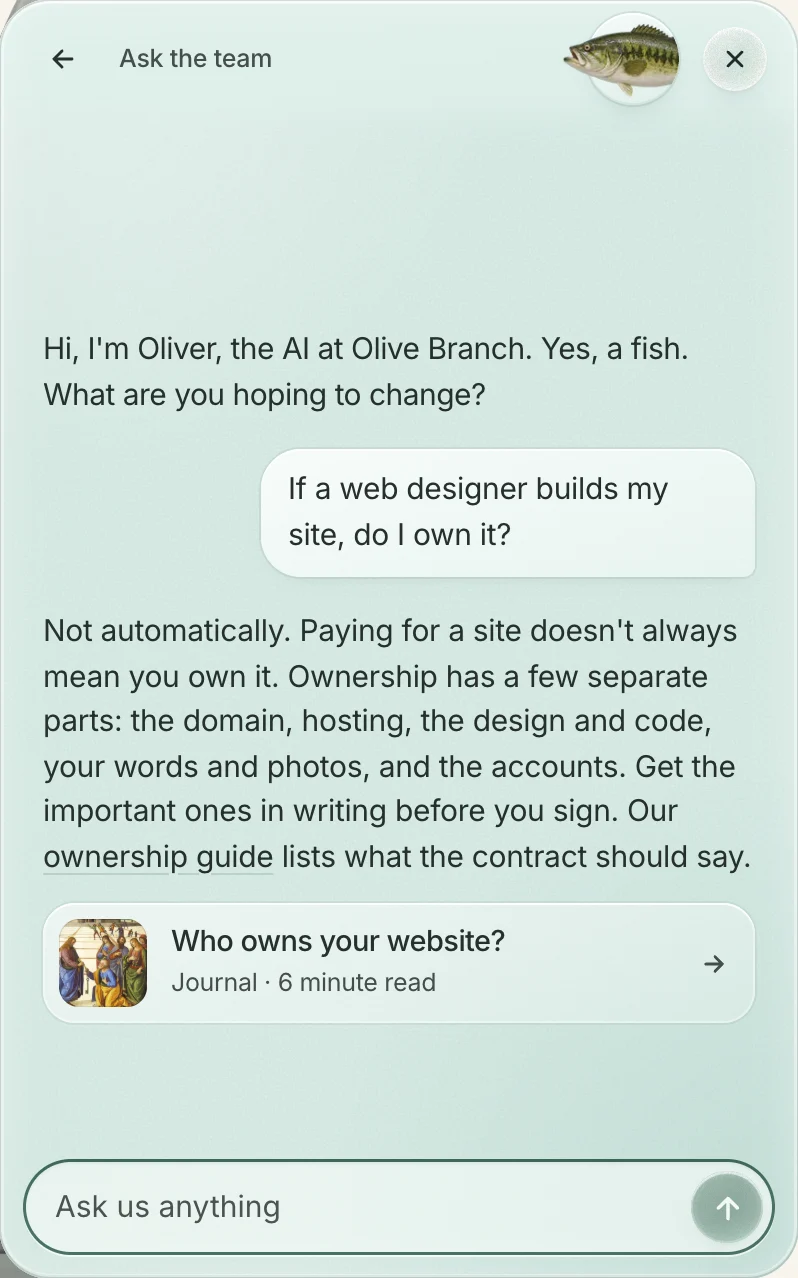
- It says it’s AI. Clutch found 90% of consumers want brands to disclose when AI is used,5 and the California Management Review article says chatbots “should always clearly identify themselves as AI agents.”7 A friendly name is fine. Pretending to be a person on your front desk isn’t.
- It stays in its lane. Its first line says what it’s for, on that page. NN/g suggests a prompt like “Not sure which plan covers you? I can help you compare” instead of “How can I help you?”6 When a question is outside what it knows, it says so.
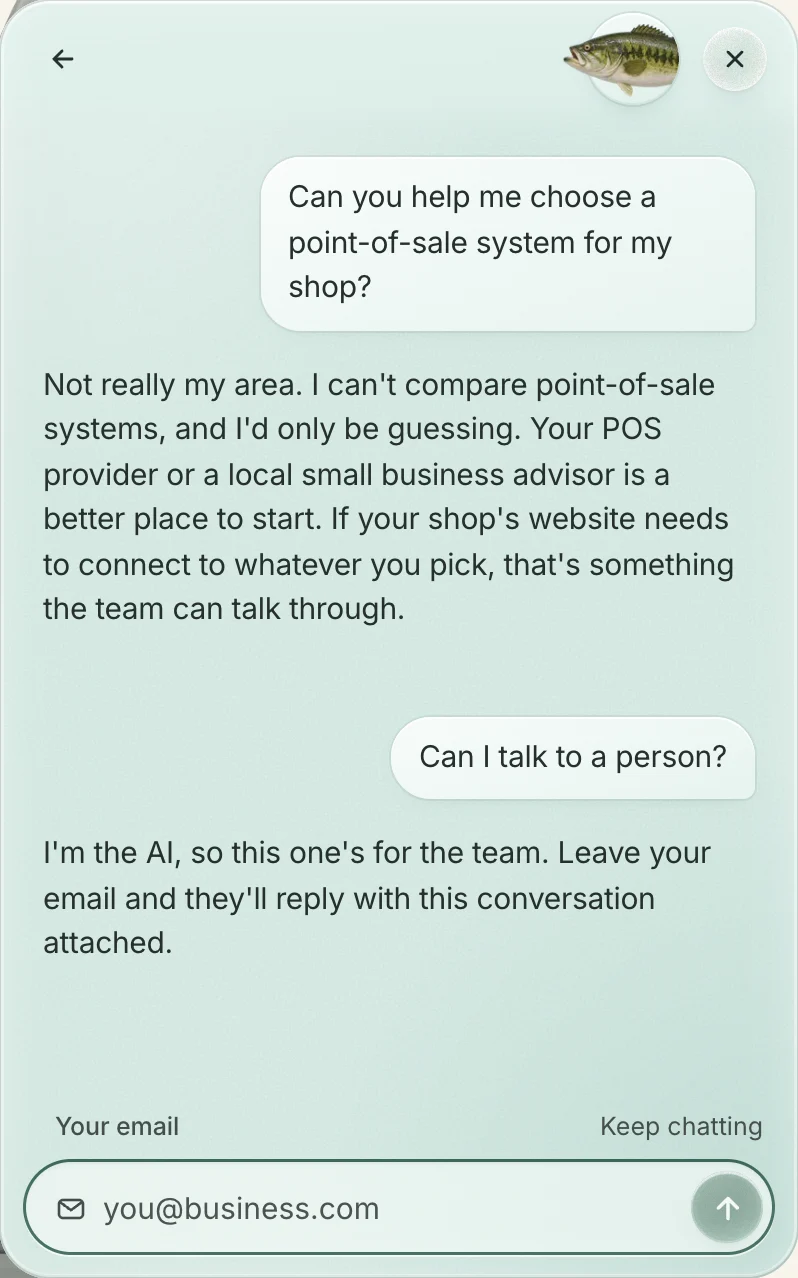
- It hands off to a person, with the conversation attached. When a chatbot can’t resolve something, Gartner says it “should provide a visible path to a human agent and pass along the information and context already collected.”2 Nobody should have to explain twice.
- Someone reads the transcripts and fixes what it got wrong. Questions it couldn’t answer become better pages. Without that, it drifts out of date as your business changes.
When is something simpler the better call?
Often. An off-the-shelf chatbot is the right answer for plenty of businesses, and no chat at all for plenty more.
An off-the-shelf bot makes sense when your questions are standard and frequent (order status, returns, opening hours), when you already run a help desk and want the bot inside it, or when the budget is tight and a standard-looking widget is fine. Support platforms are built for exactly that. If you already pay for one, see which of your apps are worth keeping.
A phone button and a clear page beat any chat when people mostly want to talk to you, when the questions are few and predictable, or when nobody would read the transcripts. Put the number where a thumb can tap it, answer the top questions on the page, and keep the form short. Getting more inquiries from the site you have walks through those fixes, and how fast to reply covers what comes after.
What if you’re a lawyer, a doctor or a financial adviser?
Be more careful. This is general information, not legal advice.
- Law. Florida Bar Ethics Opinion 24-1 (January 2024) says a lawyer “must inform prospective clients that they are communicating with an AI program and not with a lawyer or law firm employee,” and “will be ultimately responsible in the event the chatbot provides misleading information to prospective clients.” It warns against “an overly welcoming generative AI chatbot that may provide legal advice.”8 It’s one state bar’s advisory opinion, and such opinions “are not binding,” so check your own state’s guidance.
- Health. If a chatbot vendor will receive patient information for a practice covered by HIPAA, the practice needs written assurances from that vendor: federal rules require them to be “documented through a written contract or other written agreement.”9 Ask whether the vendor will sign one, and on which plan.
- Finance. Keep it to logistics: hours, what to bring, booking a call. Anything that sounds like advice about a product should come from a person, and your compliance contact should see the script first.
In all three, the safe job for an assistant is logistics and routing, with a person answering anything that depends on someone’s situation.
What should you ask before you pay for one?
Finding out should cost an hour of questions, not a year of subscription. Ask these, and ask for a demo on your own site.
- Is it trained on my content? Which pages does it read, and how does it learn when a price or service changes?
- Who manages it? You, the vendor or someone else, and how many hours a month?
- Who reads the transcripts, how often, and what happens to a wrong answer once it’s found?
- What does it do when it doesn’t know? In the demo, ask it something your site doesn’t cover. A good one says so and offers you a person.
- How does it hand off? To whom, by what route, and does the conversation go with it?
- Does it say it’s AI, and does it pop up on its own? You want yes, then no.
- Can I export the conversations, and are they mine if I leave?
- What does it cost per month, and per conversation? Some charge per seat, some per conversation. Intercom, for example, publishes its Fin AI agent at $0.99 per outcome, charged once per conversation, and its definition of an outcome includes completing a workflow, “including handoffs.”10 Ask what counts, and what a busy month would cost.
Questions
Should a chatbot pop up when someone lands on my site?
No. In Clutch’s survey, interruptions were among the top complaints about AI website tools.5 Let people open it when they want it, and label it so they can find it.
What’s the difference between a chatbot and live chat?
Live chat is a person typing back. It only works if someone is there to reply quickly; otherwise it’s a slower contact form. A chatbot answers at once, but only as well as it’s been set up.
Can I set one up myself?
Yes. Many tools let you point a bot at your own pages without code. The setup is the easy part. Keeping it accurate is the work, so decide who does that before you start.
Where we come in
Oliver, the AI assistant on our site, is our working example. He says he’s AI, and when a question needs a person, he hands you to the team. The choices behind him are in how we built our site assistant.
We design and build websites, apps and custom software, and an assistant like him is one of the things we build for clients: it answers from your own pages, says it’s AI and hands off to a person. Your phone, your form and anything else that already works stay as they are. If you do want one, it’s $1,500 to set up and $300 a month, as our pricing page shows. If the checklist said skip it, believe the checklist.